
When working on my homelab, I regularly need to pass credentials to my tools. A naive approach is to just store the token in clear text, like for example in this opentofu snippet.
provider "proxmox" { endpoint = "https://192.168.1.220:8006/" api_token = "terraform@pve!provider=REDACTED"}You probably twitched at the idea of keeping credentials in plain text files, for a good reason. Credentials should be encrypted, and only decrypted when needed. Ideally, they should even only be decrypted when needed and discarded immediately after.
Let’s see how direnv and the Bitwarden password manager’s CLI can be hooked together to let me keep my infrastructure credentials safe, in a simple, sturdy setup!
Loading environment variables when I step into a directory
Environment variables 101
To create an environment variable, I just need to “export” it, and then I can use it as follows
$ export TEST=foo$ echo $TESTfooPrograms running on my computer can use them too, even if I don’t pass them explicitly as an argument. This is only true to an extent, but we won’t dive into what processes have access to which environment variables in this blog post.
Programs that require sensitive credentials often declare a list of environment variables they will monitor for credentials. In the case of my homelab, the documentation of opentofu tells me that I need to export the PROXMOX_VE_API_TOKEN environment variable with the actual API token, and opentofu will be able to use it to do its work.
Dynamically loading environment variables with direnv
direnv is a tool that watches what is my current directory. If my current directory contains a .envrc file, direnv will “execute” it. I can install direnv on my mac with brew
$ brew install direnvSince I’m using fish, I follow the shell hook instructions for it
$ echo "direnv hook fish | source" >> ~/.config/fish/config.fishAnd now I can create an .envrc at the root my infra folder that will export the PROXMOX_VE_API_TOKEN variable.
$ cd ~/Projects/infra$ echo "export PROXMOX_VE_API_TOKEN=testvalue" > .envrcI then need to tell direnv that I approve the last changes in this file, before it consents to using it. It’s an important security measure to ensure you have reviewed what is inside the file since it last changed.
$ direnv allow .direnv: loading ~/Projects/infra/.envrcdirenv: export +PROXMOX_VE_API_TOKENI can now test that the PROXMOX_VE_API_TOKEN variable was set
$ echo $PROXMOX_VE_API_TOKENtestvalueIf I go to the parent directory, direnv indeed unloads the environment variable and it is no longer available.
$ cd ..direnv: unloading$ echo $PROXMOX_VE_API_TOKENManaging credentials with the Bitwarden CLI
Installing bw
The official Bitwarden CLI is called bw. In the Download and Install Section of the Bitwarden docs, there is no mention of homebrew. I don’t want to install an unofficial version of the Bitwarden client and hand it my credentials, but this official blog post from 2018 mentions homebrew as an install method, and the bw formula for homebrew doesn’t look suspicious.
I can install bw with homebrew
$ brew install bwLogging in
The first thing to do is of course to log in. Since I enabled 2FA, every time I log onto a new device Bitwarden asks me for a One Time Password (OTP) from my authenticator app.
$ bw login? Email address: [email protected]? Master password: [hidden]? Two-step login code: 123456You are logged in!
To unlock your vault, set your session key to the `BW_SESSION` environment variable. ex:[...]
After I logged in, it spits out a BW_SESSION key that I can reuse if I want to access the vault again without a password. Let’s lock the vault and unlock it again to confirm I don’t have to enter an OTP again.
$ bw lockYour vault is locked.$ bw unlock? Master password: [hidden]Your vault is now unlocked!
To unlock your vault, set your session key to the `BW_SESSION` environment variable. ex:[...]
Adding credentials
I like CLIs and TUIs, but I think in this particular case the GUI is much more user friendly to add credentials to the right folders. I didn’t install the standalone GUI and only use the WebExtension from my browser.
To keep things neat and tidy, I created a new Infra folder that will contain all the “technical” credentials for my infrastructure like API Keys or service account credentials.
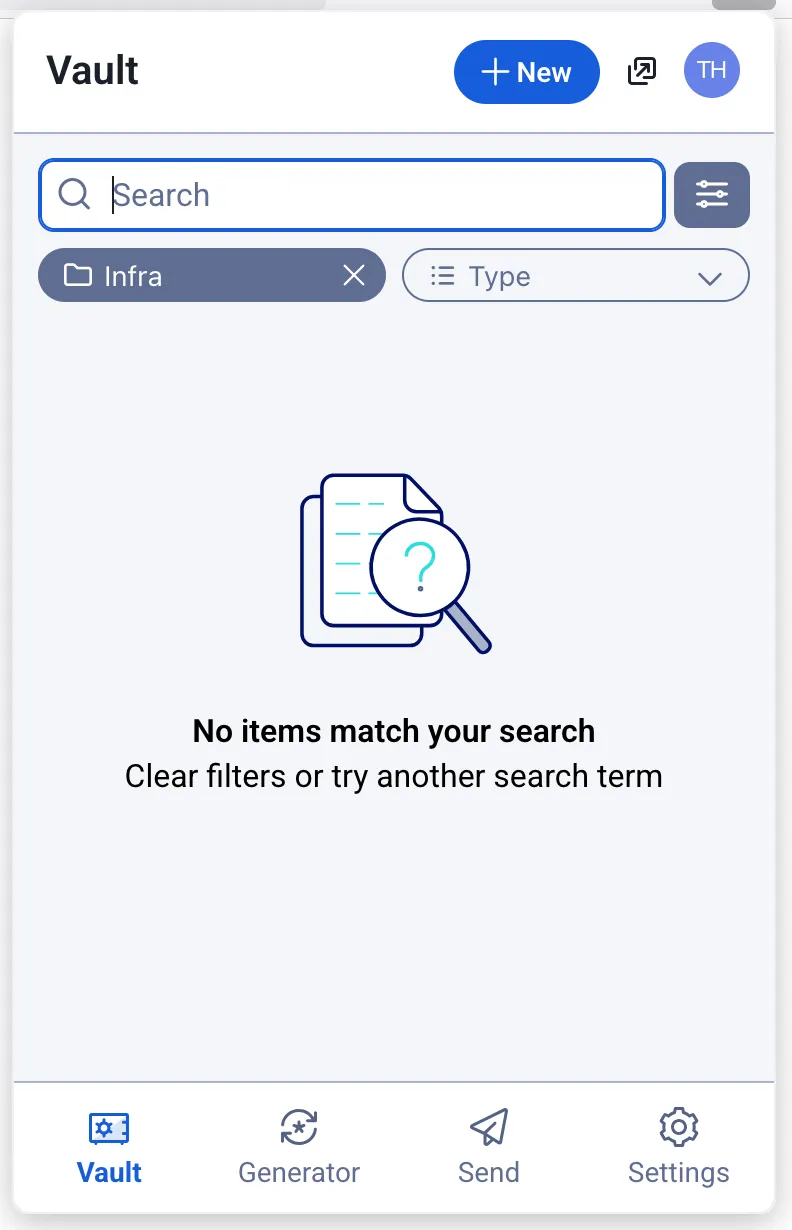
Let’s add a dummy credential called EXAMPLE_API_KEY with a random value by clicking New and Login.
I name the new secret EXAMPLE_API_KEY and only use the password field to store the actual credential. In this specific case I generated a password for it.
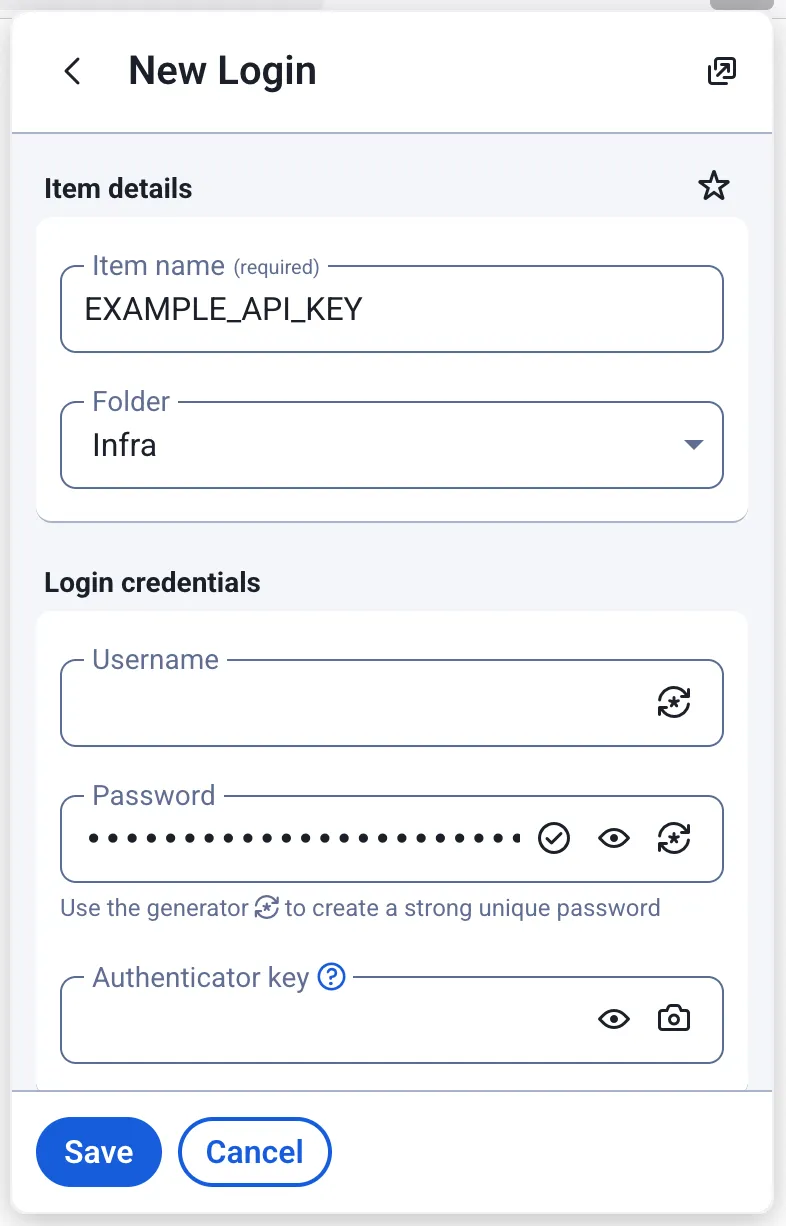
I now have a password I can look up using the CLI!
Looking up credentials
The first thing to do before looking up credentials is to unlock my vault, and export the BW_SESSION environment variable so I don’t have to append --session MYLONGLONGSESSIONTOKEN to my commands.
$ bw unlock? Master password: [hidden]Your vault is now unlocked!
To unlock your vault, set your session key to the `BW_SESSION` environment variable.[...]$ export BW_SESSION="UU3JtbpKk4FoqPEzKuaIjkijASPslJLUyj3//5E//AynYYtC/BMssNg0+qTZbGEw9ioSeEk0oIIy77DMQrBOYw=="
The Bitwarden CLI has a get command. The get command documentation tells us that it supports two modes:
- Retrieving a credential via a search term, e.g.
bw get password MY_CREDENTIAL - Retrieving a credential via its internal specific id, e.g.
bw get password 88a52664-df43-4c8a-b33b-b32300817bb0
It would be tempting to just use bw get password MY_CREDENTIAL. Unfortunately, that command doesn’t support specifying what folders to look up into. I can’t do anything like bw get password MY_CREDENTIAL --folder Infra.
There are two major drawbacks. First there is a risk of collision with my personal passwords. Second, it means I can’t have the same credential name in two distinct folders (e.g. Staging/EXAMPLE_API_KEY and Production/EXAMPLE_API_KEY).
The workaround for that is to use the bw list command twice
- Once to get the
idof the folder I want to look things up in - Once to get the
idof the credential I searched, filtered by folder id
Since bw list returns json, I will need the jq utility to parse it and retrieve values from the objects I get. I can install on my mac with
$ brew install jqUsing bw list folder --search Infra, I get a json object containing the information for that folder including its id. Piping it into jq gives me more readable results.
$ bw list folders --search Infra | jq[ { "object": "folder", "id": "3a5e2014-5f12-4379-9273-b2e300e79100", "name": "Infra" }]The result is an array that contains a single json object. I want to retrieve the value of the id field. Let’s make the bold assumption that this search query will always return a single object for now. I can use jq to retrieve the id more specifically
$ bw list folders --search Infra | jq -r '.[0].id'3a5e2014-5f12-4379-9273-b2e300e79100Awsome, I have the folder id I need! Let’s use it in the second command to find the id of the secret I actually want, and pipe it to jq to get a more human friendly result
$ bw list items --folderid 3a5e2014-5f12-4379-9273-b2e300e79100 --search EXAMPLE_API_KEY[ { "passwordHistory": null, "revisionDate": "2025-07-23T07:51:26.020Z", "creationDate": "2025-07-23T07:51:26.020Z", "deletedDate": null, "object": "item", "id": "88a52664-df43-4c8a-b33b-b32300817bb0", "organizationId": null, "folderId": "3a5e2014-5f12-4379-9273-b2e300e79100", "type": 1, "reprompt": 0, "name": "EXAMPLE_API_KEY", "notes": null, "favorite": false, "login": { "uris": [ { "match": null, "uri": "about:newtab" } ], "username": null, "password": "ID&7Z6U03cBzpO&2%KeA@DUlxh9o", "totp": null, "passwordRevisionDate": null }, "collectionIds": [] }]Let’s once again make a bold assumption that the array will always return a single object. I see that the password field is there, nested inside the login object. That login object is a field of the first (and here, only) item of my result array. Let’s use jq to unpack all that
$ bw list items --folderid 3a5e2014-5f12-4379-9273-b2e300e79100 --search EXAMPLE_API_KEY | jq -r '.[0].login.password'ID&7Z6U03cBzpO&2%KeA@DUlxh9oAfter I’m done, I need to invalidate the BW_SESSION by locking the vault with
$ bw lockRetrieving credentials from Bitwarden with direnv
Taking a step back, my happy path is the following:
- I
cdinto my~/Projects/Infradirectory - direnv detects I stepped into that directory. It looks up all the credentials I need, and exports them as environment variables
- I leave my
~/Projects/Infradirectory and direnv unloads all the environment variables
Let’s write a utility I can reuse for several projects. I need to write a bw_to_env bash function that takes as a parameter the folder in which to perform a lookup, and a list of environment variables to get credentials for. I’m making the assumption here that the secret in Bitwarden has the exact same name as the environment variable.
A utility to look up and export variables
Let’s start a bw_to_env.sh file to retrieve arguments first.
#!/bin/bash
for var in "$@"do  echo $vardone
Now let’s make it executable, and test it
$ ./bw_to_env.sh Infra EXAMPLE_API_KEY ANOTHER_KEY EXAMPLE_TOKENInfraEXAMPLE_API_KEYANOTHER_KEYEXAMPLE_TOKENGrand! Let’s add a small test to ensure we at least have a folder name and a secret name as parameters. In other words: let’s make sure we always have at least two parameters, and exit with an error message if we don’t.
#!/bin/bash
if [[ "$#" -lt 2 ]]; then  echo "You must specify at least one folder and one secret name" >&2  exit 1fi
for var in "$@"; do  echo $vardone
Now let’s assign the folder name to a proper variable to make things more readable, and use shift to “remove” it from the parameters variable.
#!/bin/bash
if [[ "$#" -lt 2 ]]; then  echo "You must specify at least one folder and one secret name" >&2  exit 1fi
folder=$1shift
echo "Looking up in $folder for passwords $@"
for var in "$@"; do  echo $vardone
Let’s test it all together
$ ./bw_to_env.sh Infra EXAMPLE_API_KEY ANOTHER_KEY EXAMPLE_TOKENLooking up in Infra for passwords EXAMPLE_API_KEYEXAMPLE_API_KEYANOTHER_KEYEXAMPLE_TOKENIt’s starting to take shape! Let’s now add Bitwarden to the mix by unlocking the vault when the script is called, and locking it after we’re done. Let’s use bw unlock --raw to only retrieve the session token, instead of the verbose message we usually get.
#!/bin/bash
if [[ "$#" -lt 2 ]]; then  echo "You must specify at least one folder and one secret name" >&2  exit 1fi
BW_SESSION=$(bw unlock --raw)
folder=$1shift
echo "Looking up in $folder for passwords $@"
for var in "$@"; do  echo $vardone
bw lock
Testing it, it still works as intended
$ ./bw_to_env.sh Infra EXAMPLE_API_KEY ANOTHER_KEY EXAMPLE_TOKEN? Master password: [hidden]Looking up in Infra for passwords EXAMPLE_API_KEYEXAMPLE_API_KEYANOTHER_KEYEXAMPLE_TOKENYour vault is locked.Now let’s check that we actually managed to log in, and exit with a non-zero code if we failed to do so.
#!/bin/bash
if [[ "$#" -lt 2 ]]; then  echo "You must specify at least one folder and one secret name" >&2  exit 1fi
BW_SESSION=$(bw unlock --raw)
if [[ -z $BW_SESSION ]]; then  echo "Failed to log into bitwarden. Ensure you're logged in with bw login, and check your password" >&2  exit 1fi
folder=$1shift
echo "Looking up in $folder for passwords $@"
for var in "$@"; do  echo $vardone
bw lock
Let’s retrieve the folder id, and exit with an error if it doesn’t exist
#!/bin/bash
if [[ "$#" -lt 2 ]]; then  echo "You must specify at least one folder and one secret name" >&2  exit 1fi
BW_SESSION=$(bw unlock --raw)
if [[ -z $BW_SESSION ]]; then  echo "Failed to log into bitwarden. Ensure you're logged in with bw login, and check your password" >&2  exit 1fi
folder=$1shift
echo "Looking up in $folder for passwords $@"
# Retrieve the folder idFOLDER_ID=$(bw list folders --search "$folder" --session "$BW_SESSION" | jq -r '.[0].id')
if [[ -z "$FOLDER_ID" || "$FOLDER_ID" = "null" ]]; then  echo "Failed to find the folder $folder. Please check if it exists and sync if needed with 'bw sync'" >&2  exit 1fi
for var in "$@"; do  echo $vardone
bw lock
Now, let’s iterate over each environment variable we’re supposed to export, and look up the appropriate credential for it.
#!/bin/bash
if [[ "$#" -lt 2 ]]; then  echo "You must specify at least one folder and one secret name" >&2  exit 1fi
BW_SESSION=$(bw unlock --raw)
if [[ -z $BW_SESSION ]]; then  echo "Failed to log into bitwarden. Ensure you're logged in with bw login, and check your password" >&2  exit 1fi
folder=$1shift
echo "Looking up in $folder"
# Retrieve the folder idFOLDER_ID=$(bw list folders --search "$folder" --session "$BW_SESSION" | jq -r '.[0].id')
if [[ -z "$FOLDER_ID" || "$FOLDER_ID" = "null" ]]; then  echo "Failed to find the folder $folder. Please check if it exists and sync if needed with 'bw sync'" >&2  exit 1fi
for environment_variable_name in "$@"; do  CREDENTIAL=$(bw list items --folderid $FOLDER_ID --search $environment_variable_name --session "$BW_SESSION" | jq -r '.[0].login.password')  if [[ -z $CREDENTIAL || $CREDENTIAL = "null" ]]; then    echo "❌️ Failed to retrieve credential for $environment_variable_name in $folder, exiting with error" >&2    exit 1  fi
  export "$environment_variable_name=$CREDENTIAL"  echo "✅️ Exported $environment_variable_name"done
bw lock
Let’s test the script
$ ./bw_to_env.sh Infra EXAMPLE_API_KEY? Master password: [hidden]Looking up in Infra✅️ Exported EXAMPLE_API_KEYYour vault is locked.$ echo $EXAMPLE_API_KEYOh? My environment variable wasn’t exported? It’s perfectly normal: parent processes don’t get variables from children, so I need to source this script first. Since fish is my default shell, I need to use bash explicitly first and then source the script.
$ bashbash-5.3$ source bw_to_env.sh Infra EXAMPLE_API_KEY? Master password: [hidden]Looking up in Infra✅️ Exported EXAMPLE_API_KEYYour vault is locked.bash-5.3$ echo $EXAMPLE_API_KEYID&7Z6U03cBzpO&2%KeA@DUlxh9oIt works! Now let’s wrap it up into a reusable function I can call from elsewhere.
#!/bin/bash
function bitwarden_password_to_env() {  if [[ "$#" -lt 2 ]]; then    echo "You must specify at least one folder and one secret name" >&2    exit 1  fi
  local BW_SESSION=$(bw unlock --raw)
  if [[ -z $BW_SESSION ]]; then    echo "Failed to log into bitwarden. Ensure you're logged in with bw login, and check your password" >&2    exit 1  fi
  local folder=$1  shift
  echo "Looking up in $folder"
  # Retrieve the folder id  local FOLDER_ID=$(bw list folders --search "$folder" --session "$BW_SESSION" | jq -r '.[0].id')
  if [[ -z "$FOLDER_ID" || "$FOLDER_ID" = "null" ]]; then    echo "Failed to find the folder $folder. Please check if it exists and sync if needed with 'bw sync'" >&2    exit 1  fi
  for environment_variable_name in "$@"; do    local CREDENTIAL=$(bw list items --folderid $FOLDER_ID --search $environment_variable_name --session "$BW_SESSION" | jq -r '.[0].login.password')    if [[ -z $CREDENTIAL || $CREDENTIAL = "null" ]]; then      echo "❌️ Failed to retrieve credential for $environment_variable_name in $folder, exiting with error" >&2      exit 1    fi
    export "$environment_variable_name=$CREDENTIAL"    echo "✅️ Exported $environment_variable_name"  done
  bw lock}
Hooking it into direnv
Having that helper into a reusable function allows me to keep very minimal .envrc for my projects. I can copy bw_to_env.sh to ~/.config/direnv/lib/, where it will be sourced.
Then, in my ~/Projects/infra/.envrc I can add the following
bitwarden_password_to_env Infra EXAMPLE_API_KEYI need to tell direnv that I reviewed the last changes and it can execute the file
$ cd ~/Projects/infra$ direnv allow .direnv: loading ~/Projects/infra/.envrc? Master password: [input is hidden] direnv: ([/opt/homebrew/Cellar/direnv/2.37.0/bin/direnv export fish]) is taking a while to execute. Use CTRL-C to give up.? Master password: [hidden]direnv has a very aggressive timeout to ensure that it’s not blocking the user. I updated the configuration in ~/.config/direnv/direnv.toml to relax it a bit and wait 30s before it starts worrying
[global]warn_timeout = "30s"Leaving and re-entering my infra directory, I can see it works like a charm!
$ cd ..direnv: unloading$ cd infra/direnv: loading ~/Projects/infra/.envrc? Master password: [hidden]Looking up in Infra✅️ Exported EXAMPLE_API_KEYYour vault is locked.direnv: export +EXAMPLE_API_KEYAnd just like that, I am now dynamically loading secrets in environment variables when I need them and unloading them when I’m done.
With direnv and Bitwarden, I have a simple, inexpensive setup to keep my credentials secure. My credentials are safe even if my laptop fails or is stolen.
Props to @movabo for their script I drew significant inspiration from, and that makes it seamless to unlock a bitwarden vault and extract a secret from it.





 Comments